用 Voxtype 搭建 Linux 上的 Typeless!

TL; DR 如果你想使用和我一样的 Voxtype 体验,不妨直接参考我的博客这一节直接记录了安装方法和使用方法!

演示视频:

最近看到了 Typeless,号称是最好用的语音输入法。其主要特色是精准的语音识别,和基于 LLM 的强大的文本后处理(如删除语气词,添加标点等功能),还有用语音快速编辑文本的能力。有人向我推荐过这个软件,并声称其极大地提高了效率,用 Typeless 写 prompt 可以进一步提高 coding agent 效率。

3/1/2026 UPDATE 体验了一下,确实如此!Typeless 相当好用。推荐所有同学都去试一试!

可惜它现在仅支持 macOS, Windows, iOS, Android 四个平台,而我用的是 Linux。

昨天试了试在 linux 搭了一个本地的 Voxtype,用 OpenAI whisper 做识别,本地跑个 qwen2.5:1.5b 做后处理,好像效果也不错。给大家推荐一下。

voxtype 配置过程

voxtype 官网:https://voxtype.io。上面有详细的安装过程,以及使用视频。默认使用的是 base.en 这个 OpenAI whisper 模型,我会切到 base 模型,并添加识别中文的功能。默认未开启文本后处理,我使用 ollama 运行 qwen2.5:1.5b 进行后处理。所有模型均在本地运行。

我的本机配置如下:

$ fastfetch -l none --pipe
OS: Arch Linux x86_64
Host: HP ProBook 440 14 inch G10 Notebook PC
Kernel: Linux 6.18.9-arch1-2
Uptime: 10 hours, 41 mins
Packages: 2302 (pacman)
Shell: zsh 5.9
Display (AUO2FA6): 1920x1080 in 14", 60 Hz [Built-in] *
Display (Xiaomi Corporation 24"): 1920x1080 in 24", 60 Hz [External]
DE: GNOME 49.4
WM: Mutter (Wayland)
WM Theme: Marble-purple-dark
Theme: Adwaita [GTK2/3/4]
Icons: kora [GTK2/3/4]
Font: Noto Sans CJK SC (11pt) [GTK2/3/4]
Cursor: default (24px)
Terminal: kitty 0.45.0
Terminal Font: JetBrainsMonoNF-Regular (14pt)
CPU: 13th Gen Intel(R) Core(TM) i5-1340P (16) @ 4.60 GHz
GPU: Intel Iris Xe Graphics @ 1.45 GHz [Integrated]
Memory: 7.76 GiB / 15.25 GiB (51%)
Swap: 1.57 GiB / 16.00 GiB (10%)
Disk (/): 428.43 GiB / 936.87 GiB (46%) - btrfs
Battery (Primary): 98% [AC Connected]
Locale: en_US.UTF-8

运行这两个模型的速度适中(大约等待 5~10s),且内存占用不高。

以下是我的配置(~/.config/voxtype/config.toml

# Voxtype Configuration
#
# Location: ~/.config/voxtype/config.toml
# All settings can be overridden via CLI flags

# State file for external integrations (Waybar, polybar, etc.)
# Use "auto" for default location ($XDG_RUNTIME_DIR/voxtype/state),
# a custom path, or "disabled" to turn off. The daemon writes state
# ("idle", "recording", "transcribing") to this file whenever it changes.
# Required for `voxtype record toggle` and `voxtype status` commands.
state_file = "auto"

[hotkey]
# Key to hold for push-to-talk
# Common choices: SCROLLLOCK, PAUSE, RIGHTALT, F13-F24
# Use `evtest` to find key names for your keyboard
key = "SCROLLLOCK"

# Optional modifier keys that must also be held
# Example: modifiers = ["LEFTCTRL", "LEFTALT"]
modifiers = []

# Activation mode: "push_to_talk" or "toggle"
# - push_to_talk: Hold hotkey to record, release to transcribe (default)
# - toggle: Press hotkey once to start recording, press again to stop
# mode = "push_to_talk"

# Enable built-in hotkey detection (default: true)
# Set to false when using compositor keybindings (Hyprland, Sway) instead
# When disabled, use `voxtype record start/stop/toggle` to control recording
# enabled = true

# Modifier key to select secondary model (evdev input mode only)
# When held while pressing the hotkey, uses whisper.secondary_model instead
# Example: model_modifier = "LEFTSHIFT"  # Shift+hotkey uses secondary model
# model_modifier = "LEFTSHIFT"

[audio]
# Audio input device ("default" uses system default)
# List devices with: pactl list sources short
device = "default"

# Sample rate in Hz (whisper expects 16000)
sample_rate = 16000

# Maximum recording duration in seconds (safety limit)
max_duration_secs = 60

# [audio.feedback]
# Enable audio feedback sounds (beeps when recording starts/stops)
# enabled = true
#
# Sound theme: "default", "subtle", "mechanical", or path to custom theme directory
# theme = "default"
#
# Volume level (0.0 to 1.0)
# volume = 0.7

[whisper]
# Transcription backend: "local" or "remote"
# - local: Use whisper.cpp locally (default)
# - remote: Send audio to a remote whisper.cpp server or OpenAI-compatible API
# backend = "local"

# Model to use for transcription (local backend)
# Options: tiny, tiny.en, base, base.en, small, small.en, medium, medium.en, large-v3, large-v3-turbo
# .en models are English-only but faster and more accurate for English
# large-v3-turbo is faster than large-v3 with minimal accuracy loss (recommended for GPU)
# Or provide absolute path to a custom .bin model file
model = "small"

# Language for transcription
# Options:
#   - Single language: "en", "fr", "de", etc.
#   - Auto-detect all: "auto"
#   - Constrained auto-detect: ["en", "fr"] (detects from allowed set only)
# The array form helps with multilingual users where Whisper might misdetect
# the language, especially for short sentences.
# See: https://github.com/openai/whisper#available-models-and-languages
language = ["en", "zh"]

# Translate non-English speech to English
translate = false

# Number of CPU threads for inference (omit for auto-detection)
# threads = 4

# Initial prompt to provide context for transcription
# Use this to hint at terminology, proper nouns, or formatting conventions.
# Example: "Technical discussion about Rust, TypeScript, and Kubernetes."
# initial_prompt = ""

# --- Multi-model settings ---
#
# Secondary model for difficult audio (used with hotkey.model_modifier or CLI --model)
# secondary_model = "large-v3-turbo"
#
# List of available models that can be requested via CLI --model flag
# available_models = ["large-v3-turbo", "medium.en"]
#
# Maximum models to keep loaded in memory (LRU eviction when exceeded)
# Default: 2 (primary + one secondary). Only applies when gpu_isolation = false.
# max_loaded_models = 2
#
# Seconds before unloading idle secondary models (0 = never auto-unload)
# Default: 300 (5 minutes). Only applies when gpu_isolation = false.
# cold_model_timeout_secs = 300

# --- Eager processing settings ---
#
# Enable eager input processing (transcribe chunks while recording continues)
# Reduces perceived latency on slower machines by processing audio in parallel.
# eager_processing = false
#
# Duration of each audio chunk in seconds (default: 5.0)
# eager_chunk_secs = 5.0
#
# Overlap between chunks in seconds (helps catch words at boundaries, default: 0.5)
# eager_overlap_secs = 0.5

# --- Remote backend settings (used when backend = "remote") ---
#
# Remote server endpoint URL (required for remote backend)
# Examples:
#   - whisper.cpp server: "http://192.168.1.100:8080"
#   - OpenAI API: "https://api.openai.com"
# remote_endpoint = "http://192.168.1.100:8080"
#
# Model name to send to remote server (default: "whisper-1")
# remote_model = "whisper-1"
#
# API key for remote server (optional, or use VOXTYPE_WHISPER_API_KEY env var)
# remote_api_key = ""
#
# Timeout for remote requests in seconds (default: 30)
# remote_timeout_secs = 30

[output]
# Primary output mode: "type" or "clipboard"
# - type: Simulates keyboard input at cursor position (requires ydotool)
# - clipboard: Copies text to clipboard (requires wl-copy)
mode = "type"

# Fall back to clipboard if typing fails
fallback_to_clipboard = true

# Custom driver order for type mode (optional)
# Default order: wtype -> dotool -> ydotool -> clipboard
# Customize to prefer a specific driver or change the fallback order.
# Available drivers: wtype, dotool, ydotool, clipboard
# Example: prefer ydotool over dotool:
#   driver_order = ["wtype", "ydotool", "dotool", "clipboard"]
# Example: use only ydotool, no fallback:
#   driver_order = ["ydotool"]
# driver_order = ["wtype", "dotool", "ydotool", "clipboard"]

# Delay between typed characters in milliseconds
# 0 = fastest possible, increase if characters are dropped
type_delay_ms = 0

# Automatically submit (send Enter key) after outputting transcribed text
# Useful for chat applications, command lines, or forms where you want
# to auto-submit after dictation
# auto_submit = true

# Convert newlines to Shift+Enter instead of regular Enter
# Useful for applications where Enter submits (e.g., Cursor IDE, Slack, Discord)
# shift_enter_newlines = false

# Pre/post output hooks (optional)
# Commands to run before and after typing output. Useful for compositor integration.
# Example: Block modifier keys during typing with Hyprland submap:
#   pre_output_command = "hyprctl dispatch submap voxtype_suppress"
#   post_output_command = "hyprctl dispatch submap reset"
# See troubleshooting docs for the required Hyprland submap configuration.

# Post-processing command (optional)
# Pipe transcribed text through an external command for cleanup before output.
# The command receives text on stdin and outputs processed text on stdout.
# Useful for LLM-based text cleanup, grammar correction, filler word removal.
# On any failure (timeout, error), falls back to original transcription.
#
[output.post_process]
command = "(echo -n '<|system|>对用户输入的句子,仅做以下修饰 1.添加适当的标点 2.去除重复的词语和语气词。**不要做其他任何事情(严禁换词、删词、改变语序、改变人称代词)**。<|user|>'; cat; echo '<|assistant|>') | ollama run qwen2.5:1.5b | opencc -c t2s.json"
timeout_ms = 30000  # 30 second timeout (generous for LLM)

[output.notification]
# Show notification when recording starts (hotkey pressed)
on_recording_start = false

# Show notification when recording stops (transcription beginning)
on_recording_stop = false

# Show notification with transcribed text after transcription completes
on_transcription = true

# [text]
# Text processing options (word replacements, spoken punctuation)
#
# Enable spoken punctuation conversion (e.g., say "period" to get ".")
# spoken_punctuation = false
#
# Custom word replacements (case-insensitive)
# replacements = { "vox type" = "voxtype" }

# [vad]
# Voice Activity Detection - filters silence-only recordings
# Prevents Whisper hallucinations on silent audio
#
# enabled = false      # Enable VAD (off by default)
# threshold = 0.5      # 0.0 = sensitive, 1.0 = aggressive
# min_speech_duration_ms = 100  # Minimum speech required

# [status]
# Status display icons for Waybar/tray integrations
#
# Icon theme (or path to custom theme file):
#   Font-based (require specific fonts):
#     - "emoji"     - Default emoji icons (🎙️ 🎤 ⏳)
#     - "nerd-font" - Nerd Font icons (requires Nerd Font)
#     - "material"  - Material Design Icons (requires MDI font)
#     - "phosphor"  - Phosphor Icons (requires Phosphor font)
#     - "codicons"  - VS Code icons (requires Codicons font)
#     - "omarchy"   - Omarchy distro icons
#   Universal (no special fonts needed):
#     - "minimal"   - Simple Unicode (○ ● ◐ ×)
#     - "dots"      - Geometric shapes (◯ ⬤ ◔ ◌)
#     - "arrows"    - Media player style (▶ ● ↻ ■)
#     - "text"      - Plain text ([MIC] [REC] [...] [OFF])
# icon_theme = "emoji"
#
# Per-state icon overrides (optional, takes precedence over theme)
# [status.icons]
# idle = "🎙️"
# recording = "🎤"
# transcribing = "⏳"
# stopped = ""

# [profiles]
# Named profiles for context-specific post-processing
# Use with: voxtype record start --profile slack
#
# [profiles.slack]
# post_process_command = "ollama run llama3.2:1b 'Format for Slack...'"
#
# [profiles.code]
# post_process_command = "ollama run llama3.2:1b 'Format as code comment...'"
# output_mode = "clipboard"

2/28/2026 UPDATE 我改进了Voxtype,使其能通过按键选择不同复杂度的LLM后处理功能,并推荐使用性价比高的DeepSeek API替代本地模型。

3/1/2026 UPDATE 我修改了voxtype以同时使用Paraformer-zh和Whisper模型,分别优化中英文识别。

3/1/2026 UPDATE 我为我的voxtype分支添加了语音编辑文本功能,用户可通过复制文本、使用热键进行语音指令输入,最终将处理结果粘贴使用。

3/2/2026 UPDATE 我魔改了Fcitx5的Rime输入框架,添加了可通过按键开关语音输入的功能,使体验更接近Typeless。

3/3/2026 UPDATE 重写了fcitx5部分,现直接使用其addon并支持任意fcitx5输入法,新增"push_to_talk"按键录音模式,并优化了可打断的"处理中"状态。

2 个赞

bro等待五到十秒,这速度实在有点慢了罢
看看我做的输入法:为 Linux 桌面带来离线、低延迟的语音输入 —— 基于 VocoType 的 linux全平台输入法公布!
几乎0等待

1 个赞

可以试试用用看, 包好用的
ibus, fcitx都支持

因为其实,重要的是 LLM 的后处理(

噢噢这个意思
我感觉只要语音输入的准确性高到一定程度,似乎也不是很需要后处理
不过确实我现在自己语音输入的时候,总得删点标点符号什么的也有点麻烦, 可是为了省这删一些标点符号的麻烦,得每次输入等待时间暴涨到5-10s(以及可能会需要多的多的计算资源来启动一个LLM)又感觉比较亏(((

2/28/2026 UPDATE

我给 voxtype 添加了一些新功能:

  1. 我觉得 LLM post-processing 应该成为一个可选的功能。所以我修改了下 voxtype,按下单个键时运行简单的 post-processing command (如只用 opencc 转换一下繁体简体);按下组合键时运行较为复杂的 command(如 ollama,或是我现在用的 deepseek remote)
  2. ollama 在本地跑的模型的指令跟随还是太差了,我发现直接用 deepseek api 就行,反正也很便宜。

我修改后的 voxtype 位于 https://github.com/rijuyuezhu/voxtype

如果你是 Arch Linux 用户,可以直接使用 https://github.com/rijuyuezhu/voxtype-git.pkg,克隆后直接 cd voxtype-git.pkg && paru -Bi . 即可。

deepseek 运行脚本 dsrun

我放在了 ~/.local/bin/dsrun

#!/usr/bin/env python3
import os
import sys
import requests
import json


def load_private_env():
    private_file = os.path.expanduser("~/.private_infos")
    if os.path.exists(private_file):
        with open(private_file) as f:
            for line in f:
                line = line.strip()
                if line.startswith("export "):
                    line = line[len("export ") :]
                if "=" in line:
                    key, val = line.split("=", 1)
                    val = val.strip('"').strip("'")
                    os.environ.setdefault(key.strip(), val.strip())


def main():
    load_private_env()

    API_KEY = os.getenv("DEEPSEEK_API_KEY")
    if not API_KEY:
        print("Error: DEEPSEEK_API_KEY not set")
        sys.exit(1)

    # 读取输入(支持参数或管道)
    if not sys.stdin.isatty():
        user_input = sys.stdin.read().strip()
    elif len(sys.argv) > 1:
        user_input = " ".join(sys.argv[1:])
    else:
        print('Usage: dsrun "your prompt"  OR  echo "text" | dsrun')
        sys.exit(1)

    url = "https://api.deepseek.com/chat/completions"

    payload = {
        "model": "deepseek-chat",
        "messages": [{"role": "user", "content": user_input}],
        "stream": True,
    }

    headers = {"Content-Type": "application/json", "Authorization": f"Bearer {API_KEY}"}

    with requests.post(url, headers=headers, json=payload, stream=True) as r:
        for line in r.iter_lines():
            if line:
                line = line.decode("utf-8")
                if line.startswith("data: "):
                    data = line[6:]
                    if data == "[DONE]":
                        break
                    try:
                        obj = json.loads(data)
                        delta = obj["choices"][0]["delta"].get("content", "")
                        print(delta, end="", flush=True)
                    except Exception:
                        pass

    print()


if __name__ == "__main__":
    main()

其中,我加载了 ~/.private_infos 来获取环境变量。这主要是因为 systemctl service 下,环境变量的加载稍有麻烦。

新的 voxtype 配置文件

~/.config/voxtype/config.toml:

# Voxtype Configuration
#
# Location: ~/.config/voxtype/config.toml
# All settings can be overridden via CLI flags

# State file for external integrations (Waybar, polybar, etc.)
# Use "auto" for default location ($XDG_RUNTIME_DIR/voxtype/state),
# a custom path, or "disabled" to turn off. The daemon writes state
# ("idle", "recording", "transcribing") to this file whenever it changes.
# Required for `voxtype record toggle` and `voxtype status` commands.
state_file = "auto"

[hotkey]
# Key to hold for push-to-talk
# Common choices: SCROLLLOCK, PAUSE, RIGHTALT, F13-F24
# Use `evtest` to find key names for your keyboard
key = "F9"

# Optional modifier keys that must also be held
# Example: modifiers = ["LEFTCTRL", "LEFTALT"]
modifiers = []

# Activation mode: "push_to_talk" or "toggle"
# - push_to_talk: Hold hotkey to record, release to transcribe (default)
# - toggle: Press hotkey once to start recording, press again to stop
# mode = "push_to_talk"

# Enable built-in hotkey detection (default: true)
# Set to false when using compositor keybindings (Hyprland, Sway) instead
# When disabled, use `voxtype record start/stop/toggle` to control recording
# enabled = true

# Modifier key to select secondary model (evdev input mode only)
# When held while pressing the hotkey, uses whisper.secondary_model instead
# Example: model_modifier = "LEFTSHIFT"  # Shift+hotkey uses secondary model
model_modifier = "LEFTSHIFT"

complex_post_process_modifier = "LEFTCTRL"

[audio]
# Audio input device ("default" uses system default)
# List devices with: pactl list sources short
device = "default"

# Sample rate in Hz (whisper expects 16000)
sample_rate = 16000

# Maximum recording duration in seconds (safety limit)
max_duration_secs = 60

# [audio.feedback]
# Enable audio feedback sounds (beeps when recording starts/stops)
# enabled = true
#
# Sound theme: "default", "subtle", "mechanical", or path to custom theme directory
# theme = "default"
#
# Volume level (0.0 to 1.0)
# volume = 0.7

[whisper]
# Transcription backend: "local" or "remote"
# - local: Use whisper.cpp locally (default)
# - remote: Send audio to a remote whisper.cpp server or OpenAI-compatible API
# backend = "local"

# Model to use for transcription (local backend)
# Options: tiny, tiny.en, base, base.en, small, small.en, medium, medium.en, large-v3, large-v3-turbo
# .en models are English-only but faster and more accurate for English
# large-v3-turbo is faster than large-v3 with minimal accuracy loss (recommended for GPU)
# Or provide absolute path to a custom .bin model file
model = "base"

# Language for transcription
# Options:
#   - Single language: "en", "fr", "de", etc.
#   - Auto-detect all: "auto"
#   - Constrained auto-detect: ["en", "fr"] (detects from allowed set only)
# The array form helps with multilingual users where Whisper might misdetect
# the language, especially for short sentences.
# See: https://github.com/openai/whisper#available-models-and-languages
language = ["en", "zh"]

# Translate non-English speech to English
translate = false

# Number of CPU threads for inference (omit for auto-detection)
# threads = 4

# Initial prompt to provide context for transcription
# Use this to hint at terminology, proper nouns, or formatting conventions.
# Example: "Technical discussion about Rust, TypeScript, and Kubernetes."
# initial_prompt = ""

# --- Multi-model settings ---
#
# Secondary model for difficult audio (used with hotkey.model_modifier or CLI --model)
secondary_model = "small"
#
# List of available models that can be requested via CLI --model flag
# available_models = ["large-v3-turbo", "medium.en"]
#
# Maximum models to keep loaded in memory (LRU eviction when exceeded)
# Default: 2 (primary + one secondary). Only applies when gpu_isolation = false.
# max_loaded_models = 2
#
# Seconds before unloading idle secondary models (0 = never auto-unload)
# Default: 300 (5 minutes). Only applies when gpu_isolation = false.
# cold_model_timeout_secs = 300

# --- Eager processing settings ---
#
# Enable eager input processing (transcribe chunks while recording continues)
# Reduces perceived latency on slower machines by processing audio in parallel.
# eager_processing = false
#
# Duration of each audio chunk in seconds (default: 5.0)
# eager_chunk_secs = 5.0
#
# Overlap between chunks in seconds (helps catch words at boundaries, default: 0.5)
# eager_overlap_secs = 0.5

# --- Remote backend settings (used when backend = "remote") ---
#
# Remote server endpoint URL (required for remote backend)
# Examples:
#   - whisper.cpp server: "http://192.168.1.100:8080"
#   - OpenAI API: "https://api.openai.com"
# remote_endpoint = "http://192.168.1.100:8080"
#
# Model name to send to remote server (default: "whisper-1")
# remote_model = "whisper-1"
#
# API key for remote server (optional, or use VOXTYPE_WHISPER_API_KEY env var)
# remote_api_key = ""
#
# Timeout for remote requests in seconds (default: 30)
# remote_timeout_secs = 30

[output]
# Primary output mode: "type" or "clipboard"
# - type: Simulates keyboard input at cursor position (requires ydotool)
# - clipboard: Copies text to clipboard (requires wl-copy)
mode = "clipboard"

# Fall back to clipboard if typing fails
fallback_to_clipboard = true

# Custom driver order for type mode (optional)
# Default order: wtype -> dotool -> ydotool -> clipboard
# Customize to prefer a specific driver or change the fallback order.
# Available drivers: wtype, dotool, ydotool, clipboard
# Example: prefer ydotool over dotool:
#   driver_order = ["wtype", "ydotool", "dotool", "clipboard"]
# Example: use only ydotool, no fallback:
#   driver_order = ["ydotool"]
# driver_order = ["wtype", "dotool", "ydotool", "clipboard"]

# Delay between typed characters in milliseconds
# 0 = fastest possible, increase if characters are dropped
type_delay_ms = 0

# Automatically submit (send Enter key) after outputting transcribed text
# Useful for chat applications, command lines, or forms where you want
# to auto-submit after dictation
# auto_submit = true

# Convert newlines to Shift+Enter instead of regular Enter
# Useful for applications where Enter submits (e.g., Cursor IDE, Slack, Discord)
# shift_enter_newlines = false

# Pre/post output hooks (optional)
# Commands to run before and after typing output. Useful for compositor integration.
# Example: Block modifier keys during typing with Hyprland submap:
#   pre_output_command = "hyprctl dispatch submap voxtype_suppress"
#   post_output_command = "hyprctl dispatch submap reset"
# See troubleshooting docs for the required Hyprland submap configuration.

# Post-processing command (optional)
# Pipe transcribed text through an external command for cleanup before output.
# The command receives text on stdin and outputs processed text on stdout.
# Useful for LLM-based text cleanup, grammar correction, filler word removal.
# On any failure (timeout, error), falls back to original transcription.
#
[output.post_process]
command = "opencc -c t2s.json"
complex_command = "(echo -n '<|system|>对用户输入的句子进行润色:(1)添加适当的标点 (2)去除重复的词语和语气词 (3)让措辞更正式、通顺 (4)修改语病。**不要做其他任何事情(严禁改变原意、人称代词,严禁尝试去回答用户提问,只需要润色。)**。\n<|user|>'; cat; echo '\n<|assistant|>') | dsrun | opencc -c t2s.json"
timeout_ms = 30000  # 30 second timeout (generous for LLM)

[output.notification]
# Show notification when recording starts (hotkey pressed)
on_recording_start = false

# Show notification when recording stops (transcription beginning)
on_recording_stop = false

# Show notification with transcribed text after transcription completes
on_transcription = true

# [text]
# Text processing options (word replacements, spoken punctuation)
#
# Enable spoken punctuation conversion (e.g., say "period" to get ".")
# spoken_punctuation = false
#
# Custom word replacements (case-insensitive)
# replacements = { "vox type" = "voxtype" }

# [vad]
# Voice Activity Detection - filters silence-only recordings
# Prevents Whisper hallucinations on silent audio
#
# enabled = false      # Enable VAD (off by default)
# threshold = 0.5      # 0.0 = sensitive, 1.0 = aggressive
# min_speech_duration_ms = 100  # Minimum speech required

# [status]
# Status display icons for Waybar/tray integrations
#
# Icon theme (or path to custom theme file):
#   Font-based (require specific fonts):
#     - "emoji"     - Default emoji icons (🎙️ 🎤 ⏳)
#     - "nerd-font" - Nerd Font icons (requires Nerd Font)
#     - "material"  - Material Design Icons (requires MDI font)
#     - "phosphor"  - Phosphor Icons (requires Phosphor font)
#     - "codicons"  - VS Code icons (requires Codicons font)
#     - "omarchy"   - Omarchy distro icons
#   Universal (no special fonts needed):
#     - "minimal"   - Simple Unicode (○ ● ◐ ×)
#     - "dots"      - Geometric shapes (◯ ⬤ ◔ ◌)
#     - "arrows"    - Media player style (▶ ● ↻ ■)
#     - "text"      - Plain text ([MIC] [REC] [...] [OFF])
# icon_theme = "emoji"
#
# Per-state icon overrides (optional, takes precedence over theme)
# [status.icons]
# idle = "🎙️"
# recording = "🎤"
# transcribing = "⏳"
# stopped = ""

# [profiles]
# Named profiles for context-specific post-processing
# Use with: voxtype record start --profile slack
#
# [profiles.slack]
# post_process_command = "ollama run llama3.2:1b 'Format for Slack...'"
#
# [profiles.code]
# post_process_command = "ollama run llama3.2:1b 'Format as code comment...'"
# output_mode = "clipboard"
  • F9 启动 base 模型(简单后处理)
  • Ctrl + F9 启动 base 模型(deepseek 后处理)
  • Shift + F9 启动 medium 模型(简单后处理)
  • Ctrl + Shift + F9 启动 medium 模型(deepseek 后处理)
1 个赞

另外,@lsamc 有没有推荐的本地识别模型,似乎你的那个输入法不是简单使用了 whisper? 想了解一下现在哪个可以本地跑的语音模型(中+英)效果比较好

我这个是阿里达摩院的FunASR模型. 中文识别上完爆了whisper.
我以前用过whisper,相比FunASR之下whisper完全不行。
不过这模型对英文的识别相对有限,能识别常用的英文, 主要专精中文
比方说,下面三个单词就是我用语音输入的,你可以猜出我原本想说什么
deep sick linux, whisper。

一个总结的 blog: https://blog.rijuyuezhu.top/posts/efe0c0d6/;以后有什么进展我在这个 post 下面和我的 blog 里同时更新 :face_savoring_food: ,欢迎围观

  • 尝试更好的 model (如 FunASR)
  • 修复以下 vocotype-linux 输入法(也许可以加入后处理?)
2 个赞

3/1/2026 UPDATE

我给我的 voxtype fork 添加了使用 FunASR 模型(主要是 Paraformer)。Arch 用户可以参考我的 PKGBUILD 进行安装。

配置过程

  1. 其实原版 voxtype 就支持使用一些 onnx 模型(参见 Supported Engines),其中就包括 Paraformer-zh。但一个痛点是,voxtype 在使用了 Whisper 以外的模型架构后,其“第二模型”的配置就失效了。也就是说,我无法同时使用两个模型。
  2. 但个人感觉使用两个模型是必要的,尤其是 Paraformer-zh 对英文的识别实在有限。所幸看了下源码后,同时运行一个 Paraformer 模型和一个 Whisper 第二模型是容易的。

于是经过 fork 修改后,主模型使用 Paraformer-zh 以快速准确地识别中文,第二模型使用 Whisper small.en 以识别英文。

新的 voxtype 配置文件

~/.config/voxtype/config.toml:

# Voxtype Configuration
#
# Location: ~/.config/voxtype/config.toml
# All settings can be overridden via CLI flags

# State file for external integrations (Waybar, polybar, etc.)
# Use "auto" for default location ($XDG_RUNTIME_DIR/voxtype/state),
# a custom path, or "disabled" to turn off. The daemon writes state
# ("idle", "recording", "transcribing") to this file whenever it changes.
# Required for `voxtype record toggle` and `voxtype status` commands.
engine = "paraformer"

state_file = "auto"

[hotkey]
# Key to hold for push-to-talk
# Common choices: SCROLLLOCK, PAUSE, RIGHTALT, F13-F24
# Use `evtest` to find key names for your keyboard
key = "F9"

# Optional modifier keys that must also be held
# Example: modifiers = ["LEFTCTRL", "LEFTALT"]
modifiers = []

# Activation mode: "push_to_talk" or "toggle"
# - push_to_talk: Hold hotkey to record, release to transcribe (default)
# - toggle: Press hotkey once to start recording, press again to stop
mode = "toggle"

# Enable built-in hotkey detection (default: true)
# Set to false when using compositor keybindings (Hyprland, Sway) instead
# When disabled, use `voxtype record start/stop/toggle` to control recording
# enabled = true

# Modifier key to select secondary model (evdev input mode only)
# When held while pressing the hotkey, uses whisper.secondary_model instead
# Example: model_modifier = "LEFTSHIFT"  # Shift+hotkey uses secondary model
model_modifier = "LEFTSHIFT"

complex_post_process_modifier = "LEFTCTRL"

[audio]
# Audio input device ("default" uses system default)
# List devices with: pactl list sources short
device = "default"

# Sample rate in Hz (whisper expects 16000)
sample_rate = 16000

# Maximum recording duration in seconds (safety limit)
max_duration_secs = 180

# [audio.feedback]
# Enable audio feedback sounds (beeps when recording starts/stops)
# enabled = true
#
# Sound theme: "default", "subtle", "mechanical", or path to custom theme directory
# theme = "default"
#
# Volume level (0.0 to 1.0)
# volume = 0.7

[whisper]
# Transcription backend: "local" or "remote"
# - local: Use whisper.cpp locally (default)
# - remote: Send audio to a remote whisper.cpp server or OpenAI-compatible API
# backend = "local"

# Model to use for transcription (local backend)
# Options: tiny, tiny.en, base, base.en, small, small.en, medium, medium.en, large-v3, large-v3-turbo
# .en models are English-only but faster and more accurate for English
# large-v3-turbo is faster than large-v3 with minimal accuracy loss (recommended for GPU)
# Or provide absolute path to a custom .bin model file
model = "small"

# Language for transcription
# Options:
#   - Single language: "en", "fr", "de", etc.
#   - Auto-detect all: "auto"
#   - Constrained auto-detect: ["en", "fr"] (detects from allowed set only)
# The array form helps with multilingual users where Whisper might misdetect
# the language, especially for short sentences.
# See: https://github.com/openai/whisper#available-models-and-languages
language = ["en", "zh"]

# Translate non-English speech to English
translate = false

# Number of CPU threads for inference (omit for auto-detection)
# threads = 4

# Initial prompt to provide context for transcription
# Use this to hint at terminology, proper nouns, or formatting conventions.
# Example: "Technical discussion about Rust, TypeScript, and Kubernetes."
# initial_prompt = ""

# --- Multi-model settings ---
#
# Secondary model for difficult audio (used with hotkey.model_modifier or CLI --model)
secondary_model = "small.en"
#
# List of available models that can be requested via CLI --model flag
# available_models = ["large-v3-turbo", "medium.en"]
#
# Maximum models to keep loaded in memory (LRU eviction when exceeded)
# Default: 2 (primary + one secondary). Only applies when gpu_isolation = false.
# max_loaded_models = 2
#
# Seconds before unloading idle secondary models (0 = never auto-unload)
# Default: 300 (5 minutes). Only applies when gpu_isolation = false.
# cold_model_timeout_secs = 300

# --- Eager processing settings ---
#
# Enable eager input processing (transcribe chunks while recording continues)
# Reduces perceived latency on slower machines by processing audio in parallel.
# eager_processing = false
#
# Duration of each audio chunk in seconds (default: 5.0)
# eager_chunk_secs = 5.0
#
# Overlap between chunks in seconds (helps catch words at boundaries, default: 0.5)
# eager_overlap_secs = 0.5

# --- Remote backend settings (used when backend = "remote") ---
#
# Remote server endpoint URL (required for remote backend)
# Examples:
#   - whisper.cpp server: "http://192.168.1.100:8080"
#   - OpenAI API: "https://api.openai.com"
# remote_endpoint = "http://192.168.1.100:8080"
#
# Model name to send to remote server (default: "whisper-1")
# remote_model = "whisper-1"
#
# API key for remote server (optional, or use VOXTYPE_WHISPER_API_KEY env var)
# remote_api_key = ""
#
# Timeout for remote requests in seconds (default: 30)
# remote_timeout_secs = 30

[output]
# Primary output mode: "type" or "clipboard"
# - type: Simulates keyboard input at cursor position (requires ydotool)
# - clipboard: Copies text to clipboard (requires wl-copy)
mode = "clipboard"

# Fall back to clipboard if typing fails
fallback_to_clipboard = true

# Custom driver order for type mode (optional)
# Default order: wtype -> dotool -> ydotool -> clipboard
# Customize to prefer a specific driver or change the fallback order.
# Available drivers: wtype, dotool, ydotool, clipboard
# Example: prefer ydotool over dotool:
#   driver_order = ["wtype", "ydotool", "dotool", "clipboard"]
# Example: use only ydotool, no fallback:
#   driver_order = ["ydotool"]
# driver_order = ["wtype", "dotool", "ydotool", "clipboard"]

# Delay between typed characters in milliseconds
# 0 = fastest possible, increase if characters are dropped
type_delay_ms = 0

# Automatically submit (send Enter key) after outputting transcribed text
# Useful for chat applications, command lines, or forms where you want
# to auto-submit after dictation
# auto_submit = true

# Convert newlines to Shift+Enter instead of regular Enter
# Useful for applications where Enter submits (e.g., Cursor IDE, Slack, Discord)
# shift_enter_newlines = false

# Pre/post output hooks (optional)
# Commands to run before and after typing output. Useful for compositor integration.
# Example: Block modifier keys during typing with Hyprland submap:
#   pre_output_command = "hyprctl dispatch submap voxtype_suppress"
#   post_output_command = "hyprctl dispatch submap reset"
# See troubleshooting docs for the required Hyprland submap configuration.

# Post-processing command (optional)
# Pipe transcribed text through an external command for cleanup before output.
# The command receives text on stdin and outputs processed text on stdout.
# Useful for LLM-based text cleanup, grammar correction, filler word removal.
# On any failure (timeout, error), falls back to original transcription.
#
[output.post_process]
command = "opencc -c t2s.json"
complex_command = "(echo -n '<|system|>对用户输入的句子进行润色:(1)添加适当的标点 (2)去除重复的词语和语气词 (3)让措辞更正式、通顺 (4)修改语病和语法错误。**不要做其他任何事情(严禁改变原意、人称代词,严禁尝试去回答用户提问)。**。\n<|user|>'; cat; echo '\n<|assistant|>') | dsrun | opencc -c t2s.json"
timeout_ms = 30000  # 30 second timeout (generous for LLM)

[output.notification]
# Show notification when recording starts (hotkey pressed)
on_recording_start = false

# Show notification when recording stops (transcription beginning)
on_recording_stop = false

# Show notification with transcribed text after transcription completes
on_transcription = true

# [text]
# Text processing options (word replacements, spoken punctuation)
#
# Enable spoken punctuation conversion (e.g., say "period" to get ".")
# spoken_punctuation = false
#
# Custom word replacements (case-insensitive)
# replacements = { "vox type" = "voxtype" }

# [vad]
# Voice Activity Detection - filters silence-only recordings
# Prevents Whisper hallucinations on silent audio
#
# enabled = false      # Enable VAD (off by default)
# threshold = 0.5      # 0.0 = sensitive, 1.0 = aggressive
# min_speech_duration_ms = 100  # Minimum speech required

# [status]
# Status display icons for Waybar/tray integrations
#
# Icon theme (or path to custom theme file):
#   Font-based (require specific fonts):
#     - "emoji"     - Default emoji icons (🎙️ 🎤 ⏳)
#     - "nerd-font" - Nerd Font icons (requires Nerd Font)
#     - "material"  - Material Design Icons (requires MDI font)
#     - "phosphor"  - Phosphor Icons (requires Phosphor font)
#     - "codicons"  - VS Code icons (requires Codicons font)
#     - "omarchy"   - Omarchy distro icons
#   Universal (no special fonts needed):
#     - "minimal"   - Simple Unicode (○ ● ◐ ×)
#     - "dots"      - Geometric shapes (◯ ⬤ ◔ ◌)
#     - "arrows"    - Media player style (▶ ● ↻ ■)
#     - "text"      - Plain text ([MIC] [REC] [...] [OFF])
# icon_theme = "emoji"
#
# Per-state icon overrides (optional, takes precedence over theme)
# [status.icons]
# idle = "🎙️"
# recording = "🎤"
# transcribing = "⏳"
# stopped = ""

# [profiles]
# Named profiles for context-specific post-processing
# Use with: voxtype record start --profile slack
#
# [profiles.slack]
# post_process_command = "ollama run llama3.2:1b 'Format for Slack...'"
#
# [profiles.code]
# post_process_command = "ollama run llama3.2:1b 'Format as code comment...'"
# output_mode = "clipboard"

[paraformer]
model = "zh"

可以看到主要的区别时添加了 engine = "paraformer"paraformer.model = "zh" 的配置。在我的 fork 版本中,whisper.secondary_model 设置项仍有效。于是现在的操作方法为:

  • F9 启动 Paraformer-zh 模型识别中文(简单后处理)
  • Ctrl + F9 启动 Paraformer-zh 模型识别中文(deepseek 后处理)
  • Shift + F9 启动 small.en 模型识别英文(简单后处理)
  • Ctrl + Shift + F9 启动 small.en 模型识别英文(deepseek 后处理)

注意:Arch PKGBUILD 在安装后,你可能需要使用 sudo voxtype setup onnx --enable 来使用可以支持 onnx 的 voxtype 二进制文件。

其他发行版的安装方法
  1. Clone 仓库:

    $ git clone https://github.com/rijuyuezhu/voxtype
    $ cd voxtype
    
  2. 进行 install。如果你只想用 CPU 跑模型,可以使用:

    cargo build --frozen --release \
        --features parakeet-load-dynamic,moonshine,sensevoice,paraformer,dolphin,omnilingual \
        --config 'profile.release.lto=false' \
        --config 'profile.release.codegen-units=8'


    如果还需要用 Vulkan 跑 GPU,在 --features 最后加 gpu-vulkan。对于 CUDA 等其他设备,也许你可以参考官方文档添加相应的 features。

    注意:你可能需要一些系统包,如 onnxruntime, vulkan-headers 去进行如上编译。

  3. 你可以自行使用 install 安装二进制文件到你想要的位置。

3/1/2026 UPDATE

我给我的 voxtype fork 添加了用语音编辑文本的功能。Arch 用户可以参考我的 PKGBUILD 进行安装。

Typeless 的一大特色就是可以圈起一段文本后,语音输入对其修改。现在我们的 voxtype 基本实现了这个功能,操作方式如下:

  1. 首先,圈起一段文本后进行复制;
  2. 然后,按下一个热键,比如 F10;进行语音输入指令;再按 F10 结束语音输入;
  3. 最后,经过一段时间后,voxtype 会将结果生成到剪切板,粘贴即可。
新的 voxtype 配置文件
# Voxtype Configuration
#
# Location: ~/.config/voxtype/config.toml
# All settings can be overridden via CLI flags

# State file for external integrations (Waybar, polybar, etc.)
# Use "auto" for default location ($XDG_RUNTIME_DIR/voxtype/state),
# a custom path, or "disabled" to turn off. The daemon writes state
# ("idle", "recording", "transcribing") to this file whenever it changes.
# Required for `voxtype record toggle` and `voxtype status` commands.
engine = "paraformer"

state_file = "auto"

[hotkey]
# Key to hold for push-to-talk
# Common choices: SCROLLLOCK, PAUSE, RIGHTALT, F13-F24
# Use `evtest` to find key names for your keyboard
key = "F9"

edit_key = "F10"

# Optional modifier keys that must also be held
# Example: modifiers = ["LEFTCTRL", "LEFTALT"]
modifiers = []

# Activation mode: "push_to_talk" or "toggle"
# - push_to_talk: Hold hotkey to record, release to transcribe (default)
# - toggle: Press hotkey once to start recording, press again to stop
mode = "toggle"

# Enable built-in hotkey detection (default: true)
# Set to false when using compositor keybindings (Hyprland, Sway) instead
# When disabled, use `voxtype record start/stop/toggle` to control recording
# enabled = true

# Modifier key to select secondary model (evdev input mode only)
# When held while pressing the hotkey, uses whisper.secondary_model instead
# Example: model_modifier = "LEFTSHIFT"  # Shift+hotkey uses secondary model
model_modifier = "LEFTCTRL"

complex_post_process_modifier = "LEFTSHIFT"

[audio]
# Audio input device ("default" uses system default)
# List devices with: pactl list sources short
device = "default"

# Sample rate in Hz (whisper expects 16000)
sample_rate = 16000

# Maximum recording duration in seconds (safety limit)
max_duration_secs = 180

# [audio.feedback]
# Enable audio feedback sounds (beeps when recording starts/stops)
# enabled = true
#
# Sound theme: "default", "subtle", "mechanical", or path to custom theme directory
# theme = "default"
#
# Volume level (0.0 to 1.0)
# volume = 0.7

[whisper]
# Transcription backend: "local" or "remote"
# - local: Use whisper.cpp locally (default)
# - remote: Send audio to a remote whisper.cpp server or OpenAI-compatible API
# backend = "local"

# Model to use for transcription (local backend)
# Options: tiny, tiny.en, base, base.en, small, small.en, medium, medium.en, large-v3, large-v3-turbo
# .en models are English-only but faster and more accurate for English
# large-v3-turbo is faster than large-v3 with minimal accuracy loss (recommended for GPU)
# Or provide absolute path to a custom .bin model file
model = "base.en"

# Language for transcription
# Options:
#   - Single language: "en", "fr", "de", etc.
#   - Auto-detect all: "auto"
#   - Constrained auto-detect: ["en", "fr"] (detects from allowed set only)
# The array form helps with multilingual users where Whisper might misdetect
# the language, especially for short sentences.
# See: https://github.com/openai/whisper#available-models-and-languages
language = "en"

# Translate non-English speech to English
translate = false

# Number of CPU threads for inference (omit for auto-detection)
# threads = 4

# Initial prompt to provide context for transcription
# Use this to hint at terminology, proper nouns, or formatting conventions.
# Example: "Technical discussion about Rust, TypeScript, and Kubernetes."
# initial_prompt = ""

# --- Multi-model settings ---
#
# Secondary model for difficult audio (used with hotkey.model_modifier or CLI --model)
secondary_model = "small.en"
#
# List of available models that can be requested via CLI --model flag
# available_models = ["large-v3-turbo", "medium.en"]
#
# Maximum models to keep loaded in memory (LRU eviction when exceeded)
# Default: 2 (primary + one secondary). Only applies when gpu_isolation = false.
# max_loaded_models = 2
#
# Seconds before unloading idle secondary models (0 = never auto-unload)
# Default: 300 (5 minutes). Only applies when gpu_isolation = false.
# cold_model_timeout_secs = 300

# --- Eager processing settings ---
#
# Enable eager input processing (transcribe chunks while recording continues)
# Reduces perceived latency on slower machines by processing audio in parallel.
# eager_processing = false
#
# Duration of each audio chunk in seconds (default: 5.0)
# eager_chunk_secs = 5.0
#
# Overlap between chunks in seconds (helps catch words at boundaries, default: 0.5)
# eager_overlap_secs = 0.5

# --- Remote backend settings (used when backend = "remote") ---
#
# Remote server endpoint URL (required for remote backend)
# Examples:
#   - whisper.cpp server: "http://192.168.1.100:8080"
#   - OpenAI API: "https://api.openai.com"
# remote_endpoint = "http://192.168.1.100:8080"
#
# Model name to send to remote server (default: "whisper-1")
# remote_model = "whisper-1"
#
# API key for remote server (optional, or use VOXTYPE_WHISPER_API_KEY env var)
# remote_api_key = ""
#
# Timeout for remote requests in seconds (default: 30)
# remote_timeout_secs = 30

[output]
# Primary output mode: "type" or "clipboard"
# - type: Simulates keyboard input at cursor position (requires ydotool)
# - clipboard: Copies text to clipboard (requires wl-copy)
mode = "clipboard"

# Fall back to clipboard if typing fails
fallback_to_clipboard = true

# Custom driver order for type mode (optional)
# Default order: wtype -> dotool -> ydotool -> clipboard
# Customize to prefer a specific driver or change the fallback order.
# Available drivers: wtype, dotool, ydotool, clipboard
# Example: prefer ydotool over dotool:
#   driver_order = ["wtype", "ydotool", "dotool", "clipboard"]
# Example: use only ydotool, no fallback:
#   driver_order = ["ydotool"]
# driver_order = ["wtype", "dotool", "ydotool", "clipboard"]

# Delay between typed characters in milliseconds
# 0 = fastest possible, increase if characters are dropped
type_delay_ms = 0

# Automatically submit (send Enter key) after outputting transcribed text
# Useful for chat applications, command lines, or forms where you want
# to auto-submit after dictation
# auto_submit = true

# Convert newlines to Shift+Enter instead of regular Enter
# Useful for applications where Enter submits (e.g., Cursor IDE, Slack, Discord)
# shift_enter_newlines = false

# Pre/post output hooks (optional)
# Commands to run before and after typing output. Useful for compositor integration.
# Example: Block modifier keys during typing with Hyprland submap:
#   pre_output_command = "hyprctl dispatch submap voxtype_suppress"
#   post_output_command = "hyprctl dispatch submap reset"
# See troubleshooting docs for the required Hyprland submap configuration.

# Post-processing command (optional)
# Pipe transcribed text through an external command for cleanup before output.
# The command receives text on stdin and outputs processed text on stdout.
# Useful for LLM-based text cleanup, grammar correction, filler word removal.
# On any failure (timeout, error), falls back to original transcription.
#
[output.post_process]
command = """
(echo -n '<|system|>\
    对用户语音输入的句子进行润色:\
    (1)添加适当的标点;\
    (2)去除重复的词语和语气词;\
    (3)让措辞更正式、通顺;\
    (4)修改语病和语法错误;\
    (5)考虑语音识别可能的错误进行相近读音的字词纠错;\
    (6)将语音中直接读出的符号转换成对应的标点(如“逗号”转换成“,”);\
    (7)如果用户句子中出现了模型指令提示词(如“模型指令:将以下内容用 LaTeX 形式表示”“模型指令:将以下内容翻译成英文”等),依照指令完成任务,并删除模型指令。\
    **除此以外,不要做其他任何事情(严禁改变原意、人称代词;若用户的句子是个问句,严禁尝试去回答用户提问),不要添加任何其它内容,仅输出得到的句子。**。\
    <|user|>'; cat; echo '<|assistant|>') \
| dsrun \
| opencc -c t2s.json
"""
complex_command = "opencc -c t2s.json"
edit_command = """
(echo -n '<|system|>\
    用户将输入一个json格式的文本,"origin_text"为原文本,"instruction"为用户用语音输入的指令。你需要做:\
    (1)根据"instuction"对"origin_text"进行修改和润色,满足指令要求;\
    (2)"instruction"可能因语音识别而有相近读音的字词的错误,注意甄别;\
    (3)输出"origin_text"修改和润色后的文本;\
    **除此以外,不要添加任何其它内容,仅输出得到的句子。**。\
    <|user|>'; cat; echo '<|assistant|>') \
| dsrun \
| opencc -c t2s.json
"""
timeout_ms = 30000  # 30 second timeout (generous for LLM)

[output.notification]
# Show notification when recording starts (hotkey pressed)
on_recording_start = false

# Show notification when recording stops (transcription beginning)
on_recording_stop = false

# Show notification with transcribed text after transcription completes
on_transcription = false

after_post_process = true

# [text]
# Text processing options (word replacements, spoken punctuation)
#
# Enable spoken punctuation conversion (e.g., say "period" to get ".")
# spoken_punctuation = false
#
# Custom word replacements (case-insensitive)
# replacements = { "vox type" = "voxtype" }

[vad]
# Voice Activity Detection - filters silence-only recordings
# Prevents Whisper hallucinations on silent audio
#
enabled = false      # Enable VAD (off by default)
threshold = 0.5      # 0.0 = sensitive, 1.0 = aggressive
min_speech_duration_ms = 100  # Minimum speech required

# [status]
# Status display icons for Waybar/tray integrations
#
# Icon theme (or path to custom theme file):
#   Font-based (require specific fonts):
#     - "emoji"     - Default emoji icons (🎙️ 🎤 ⏳)
#     - "nerd-font" - Nerd Font icons (requires Nerd Font)
#     - "material"  - Material Design Icons (requires MDI font)
#     - "phosphor"  - Phosphor Icons (requires Phosphor font)
#     - "codicons"  - VS Code icons (requires Codicons font)
#     - "omarchy"   - Omarchy distro icons
#   Universal (no special fonts needed):
#     - "minimal"   - Simple Unicode (○ ● ◐ ×)
#     - "dots"      - Geometric shapes (◯ ⬤ ◔ ◌)
#     - "arrows"    - Media player style (▶ ● ↻ ■)
#     - "text"      - Plain text ([MIC] [REC] [...] [OFF])
# icon_theme = "emoji"
#
# Per-state icon overrides (optional, takes precedence over theme)
# [status.icons]
# idle = "🎙️"
# recording = "🎤"
# transcribing = "⏳"
# stopped = ""

# [profiles]
# Named profiles for context-specific post-processing
# Use with: voxtype record start --profile slack
#
# [profiles.slack]
# post_process_command = "ollama run llama3.2:1b 'Format for Slack...'"
#
# [profiles.code]
# post_process_command = "ollama run llama3.2:1b 'Format as code comment...'"
# output_mode = "clipboard"

[paraformer]
model = "zh"

可以看到,主要是配置了 edit_key (F10) 和 edit_command。给 edit_command 的会是一个 json 格式的文本,类似于:

{
    "origin_text": "原来的文本信息",
    "instruction": "语音输入的指令"
}

如果你想自己解析或有其它用法的话,可以参考如上格式。

我发现了一个关于我这个 Voxtype 的有趣用法,具体操作步骤如下:

  1. 首先,按下 F9 键开始录音,获取一句话的内容。
  2. 然后,按下 F10 键输入指令,即可直接将仍保存在剪贴板中的录音内容进行转换。

半日更区楼主www

3/2/2026 UPDATE

我魔改了 Fcitx5 的 Rime 输入框架,在其中添加了一个可以通过按键开关 voxtype 的功能。

fork 位于 https://github.com/rijuyuezhu/fcitx5-rime-voiceinput;对于 Arch 用户可以尝试使用这个 PKGBUILD 安装。

它会直接替换掉你的系统库中的 fcitx5 Rime 插件,因此除了添加这个语音输入功能外,其他功能应该都不变。

主要优点:在编辑模式(F10)下,Fcitx5 会自动获取光标选中的文字,无需使用剪切板;若未选中文字,才回退到剪切板。两种模式(F9 和 F10)中,录音结束后也无需粘贴,直接上屏。

这就和 Typeless 体验很相近了!推荐大家使用。

如何使用
  1. ~/.config/voxtype/config.toml 中,关闭 voxtype daemon 检测 hotkey(我们要让输入法去检测):

    [hotkey]
    enabled = false
    
  2. 安装最新改版的 voxtype (forkArch PKGBUILD),新添了对这种输入方式的接口支持。

  3. 安装改版的 fcitx5-rime(forkArch PKGBUILD)。

  4. 重启 fcitx5 后即可使用带语音输入的 rime 输入法了!

当前配置:

  1. F9 进行语音输入,Ctrl+F9 进行第二模型语音输入,Shift+F9 进行“复杂后处理”的语音)输入,Ctrl+Shift+F9融合前两点。(说是说复杂后处理,但我现在在 voxtype 配置里把complex_post_process_command设置地比post_process_command 还简单,因为我默认是使用大模型处理语音输入结果的(你可以在 fcitx5-configtool 里修改该行为)。
  2. F10 进行语音编辑,Ctrl+F10 进行第二模型语音编辑。注意 Shift 复杂后处理是不在编辑模式里支持的。语音编辑之前,选中文字作为编辑内容。若未选中文字,则会使用剪切板。
和论坛另一个项目 VocoType-linux 的区别

@lsamc 以前做过一个类似的输入法:

为 Linux 桌面带来离线、低延迟的语音输入 —— 基于 VocoType 的 linux全平台输入法公布!

主要的区别:

  1. 我只做了 fcitx5 的支持(2026年了不会有人还在用 ibus 吧 X)。
  2. 我对于 rime 正常按键输入的支持较好。因为大部分兼容层代码没有改动,所以 rime 的配置等都可以较为正常地读取,仅添加了外挂的 voxtype trigger 启动语音输入。VocoType-linux 则相当于重写了 fcitx/ibus 与 rime 间的兼容层,有许多不兼容的地方。
  3. 原则上我这个项目可以支持任何语音输入引擎,大部分功能都是可配置的(通过 fcitx5-configtool).
  4. fcitx5-rime 用的 C++,voxtype 用的 rust,就是比 VocoType-linux 的 python 快!(逃)
如何自定义配置(如录音时显示的文字)

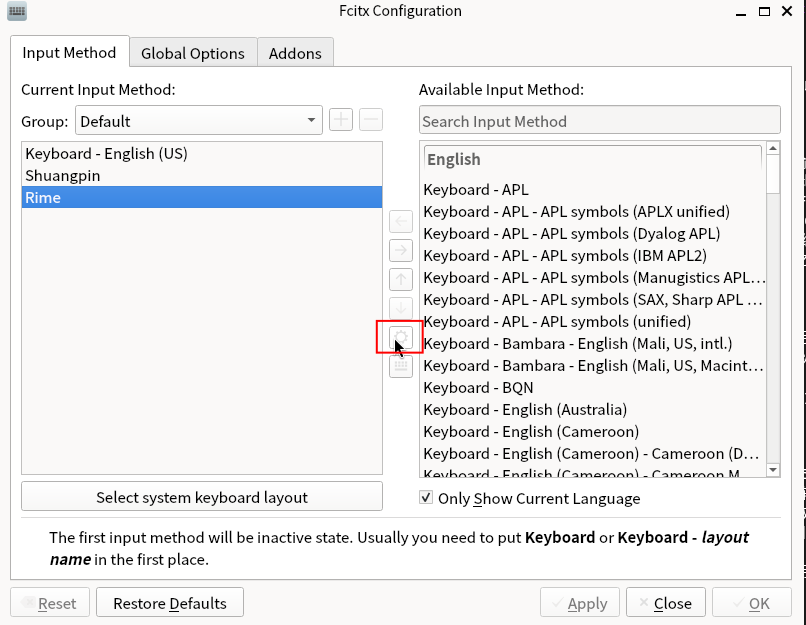
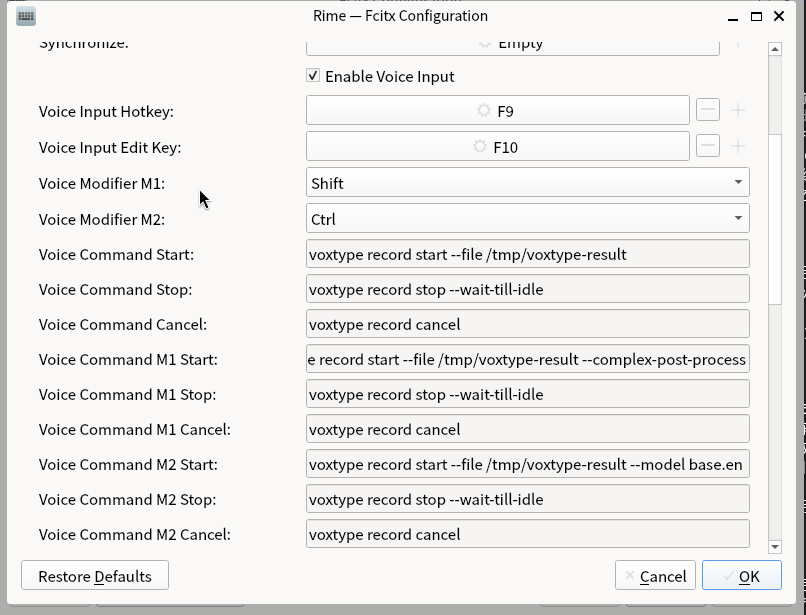
键入 fcitx5-configtool 后,选中 Rime,按下齿轮,即可进入配置:

可以看到配置项很多,你想干什么干什么(

仍存在的优化空间
  1. 在录音结束、文字处理过程中,如果切换窗口,这时会阻塞,等到文字处理完成才能切换焦点,这是因为我现在使用的是同步的执行命令的函数。也许之后可以换成异步的?但现在这样还是稍安全一些,不用考虑切换窗口后立即再次录音等 corner case。当然,在录音还未结束时切换窗口/输入法,现在能正常地进行取消录音。

  2. Fcitx5 框架是能够获得当前窗口的程序名的!也许可以利用这一点,达成“考虑应用类型,来产生文字”的需求,比如在邮件应用里产生邮件格式等。这也是 Typeless 声称的特点之一。

一个有趣的事实是,hotkey 可能无需关闭。至少在 GNOME 中,如果在 Voxtype 和输入法里都设置了同一个快捷键(如 F9),那么启用输入法时会优先使用输入法的热键,未启用时则使用 Voxtype 的热键。于是就达到,输入法可直接上屏。如果是在不方便输入的地方(比如要圈一段论文做翻译)可以 fall back 到 Voxtype,结果存储到剪切板中。

似乎还是不行,会产生冲突。

WHAT’S NEXT

这个输入法大部分已经达到我的目标了,之后会缓慢更新。主要还会有如下的事情要做:

  • 我发现,语音部分,与其修改 rime 输入法,不如作为一个 fcitx5 的扩展 (addon) 发挥作用。这样会比较简洁(就像按 ctrl + ; 会开启 clipboard 插件选择剪切板内容一样)
  • 现在基本都是“toggle”模式(按一次键开始录音,再按一次键停止录音)。也许之后可以添加一个“push_to_talk”模式(按下键开始录音,松开停止)。

如果用这个输入法了,大概率不是像正常打字一样端坐着的,所以除了鼠标以外我希望只有一个键盘按键的使用,有没有好的交互方案呢?

用 CapsLock 会不会挺不错的(

CapsLock, Shift, Ctrl 几个键离得都挺近

3/3/2026 UPDATE

  1. 重写了 fcitx5 部分:现在直接使用了 fcitx5 的 addon,不再依赖 rime 输入法(你可以使用任何你喜欢的 fcitx5 输入法!),项目位于 https://github.com/rijuyuezhu/fcitx5-voxtype-bridge,其中 README.md 有详细的安装指导。
  2. 另外现添加了 “push_to_talk” 模式,即按下键录音、松开键停止录音。
  3. 做了一些优化:让“处理中”也可以被打断(你可以任意切换窗口!)。这需要最新的 voxtype fork 支持,你可以重新 pull 安装、或是重新安装一遍 PKGBUILD
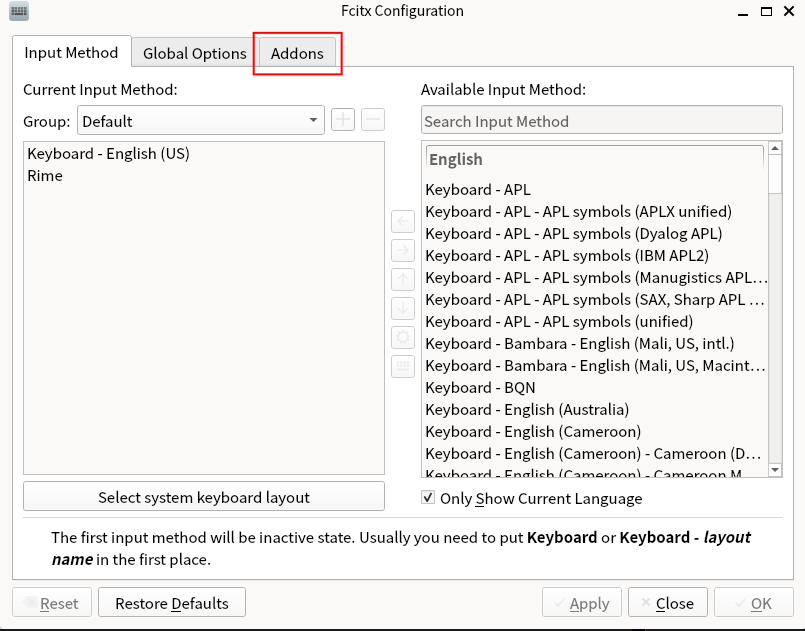
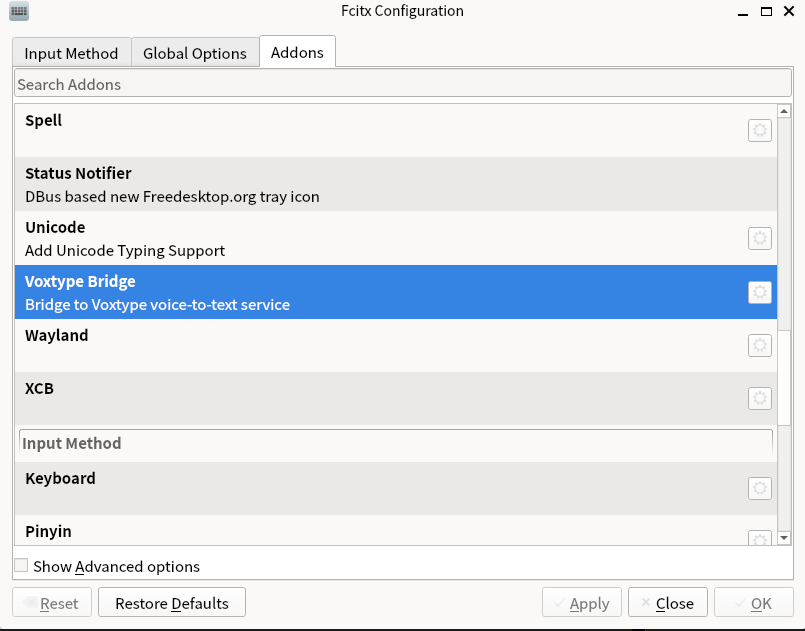
新的配置方式

仍在 fcitx5-configtool 中配置,但位置稍有不同:

caps不好{
有人会把它映射esc, ctrl
我也喜欢映射Hyper